Takeout Your Code
You can always takeout your code to your own Github/Gitlab account. You have this opportunity for backup strategies, to continue the development manually, to merge the Mindbricks generated services with your other applications or for manual deployment.
Scope
This document shows how to takeout your code, best practices for reusing Mindbricks services with in your external development projects and an extensive guide to deploy Mindbricks generated application manually to your owned servers.
Takeout Your Application
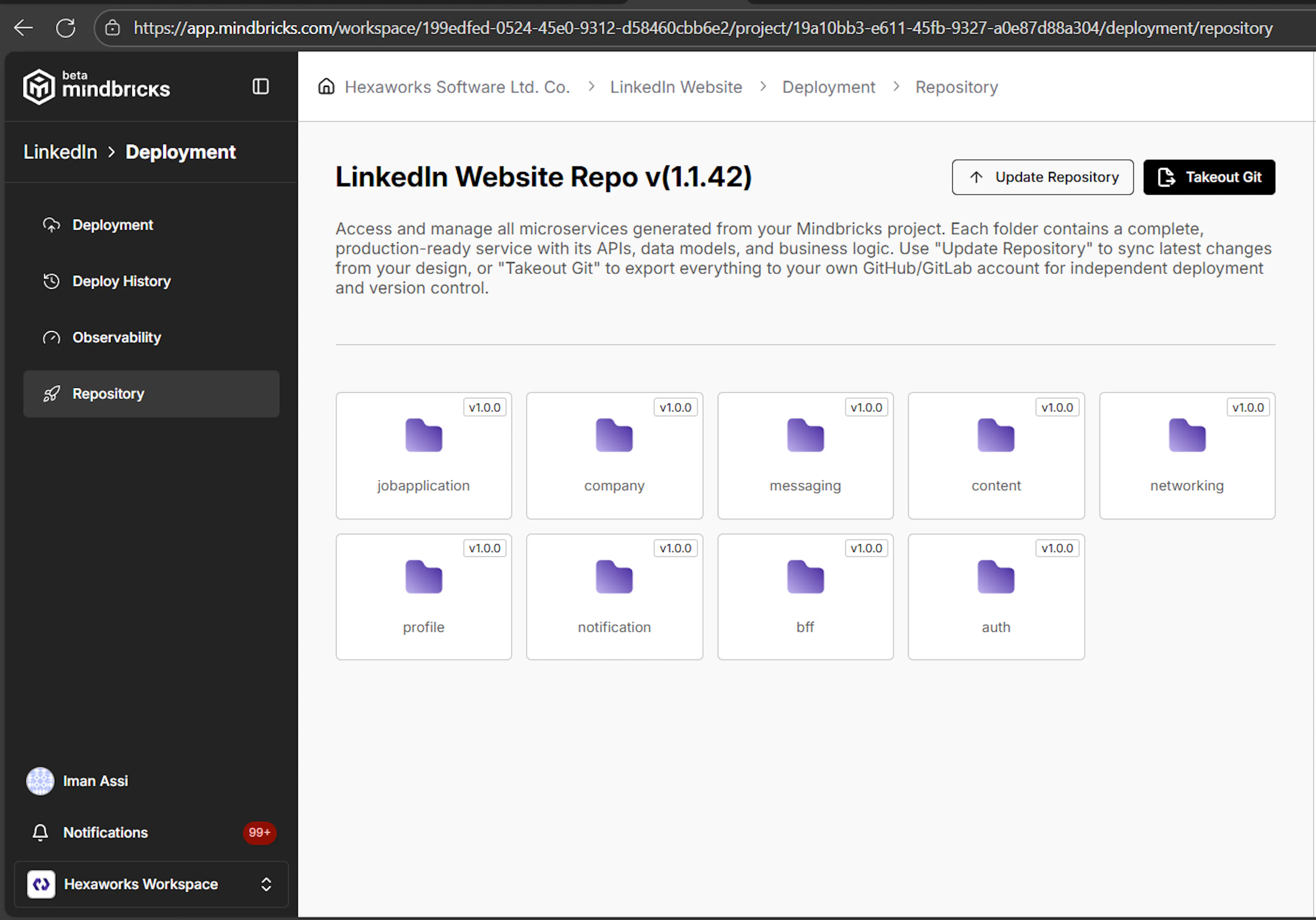
It is your design, your code. You have got full copyrights on your code. Though it is strongly recommended to use Mindbricks own development and deployment environment for managing a perfect project life cycle, you may need to have your own code out in your own repositories. So Mindbricks give you all tools to be able to take your code out to your own properties.
GitHub / GitLab Settings for Takeout
Mindbricks allows you to export your generated application code to your own GitHub or GitLab repositories, giving you full ownership and control over your backend.
Before taking your code out, you must configure a repository provider at the workspace level.
Supported Repository Providers
Mindbricks currently supports:
-
GitHub
-
GitLab
You can choose either provider based on your organization’s workflow and infrastructure.
Configuring GitHub for Takeout
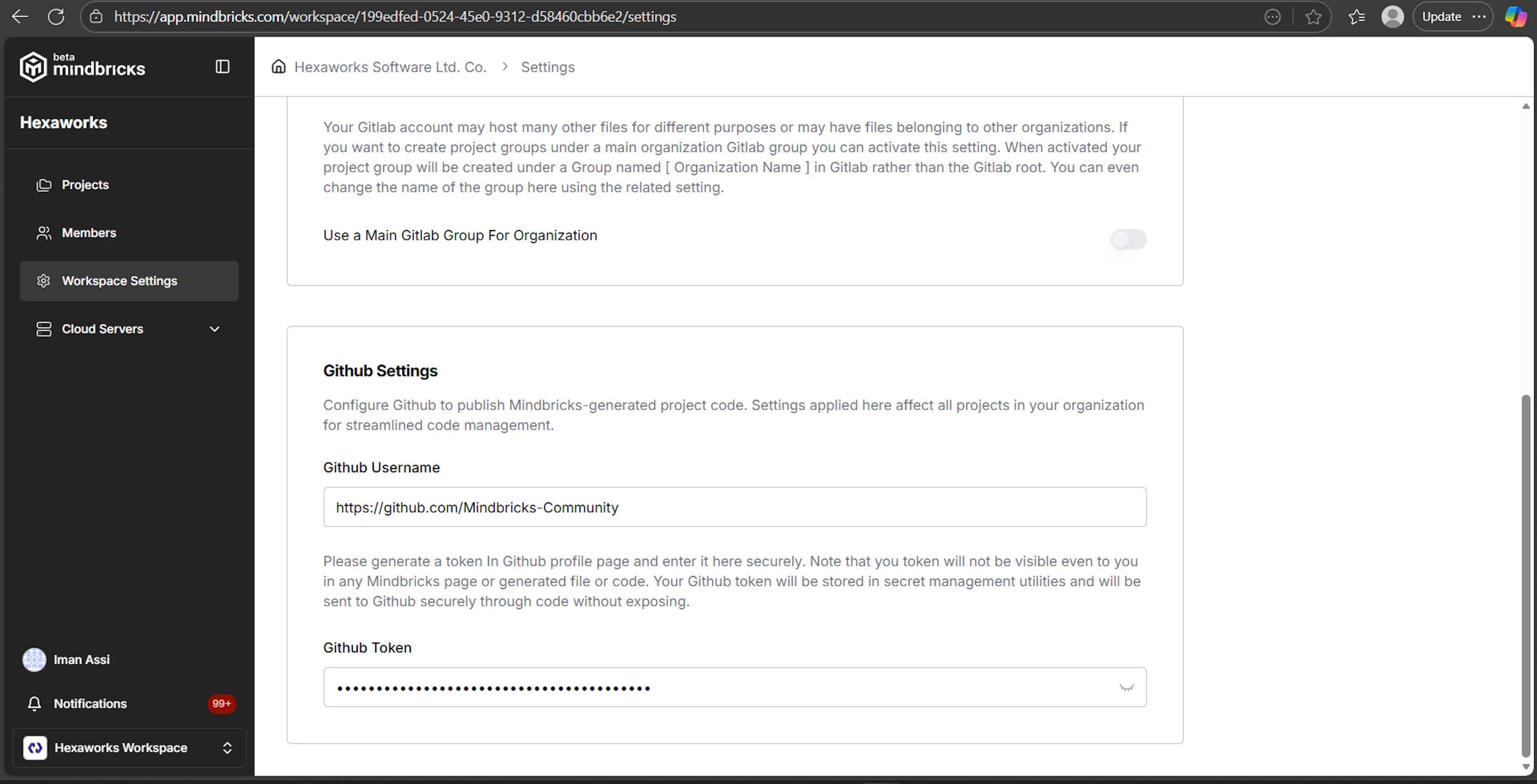
To enable GitHub takeout, configure the following in Workspace Settings:
-
GitHub username
-
GitHub personal access token with repository permissions
Once configured, Mindbricks can:
-
Create repositories under your GitHub account
-
Push generated service code automatically
-
Update repositories when project designs change
Configuring GitLab for Takeout
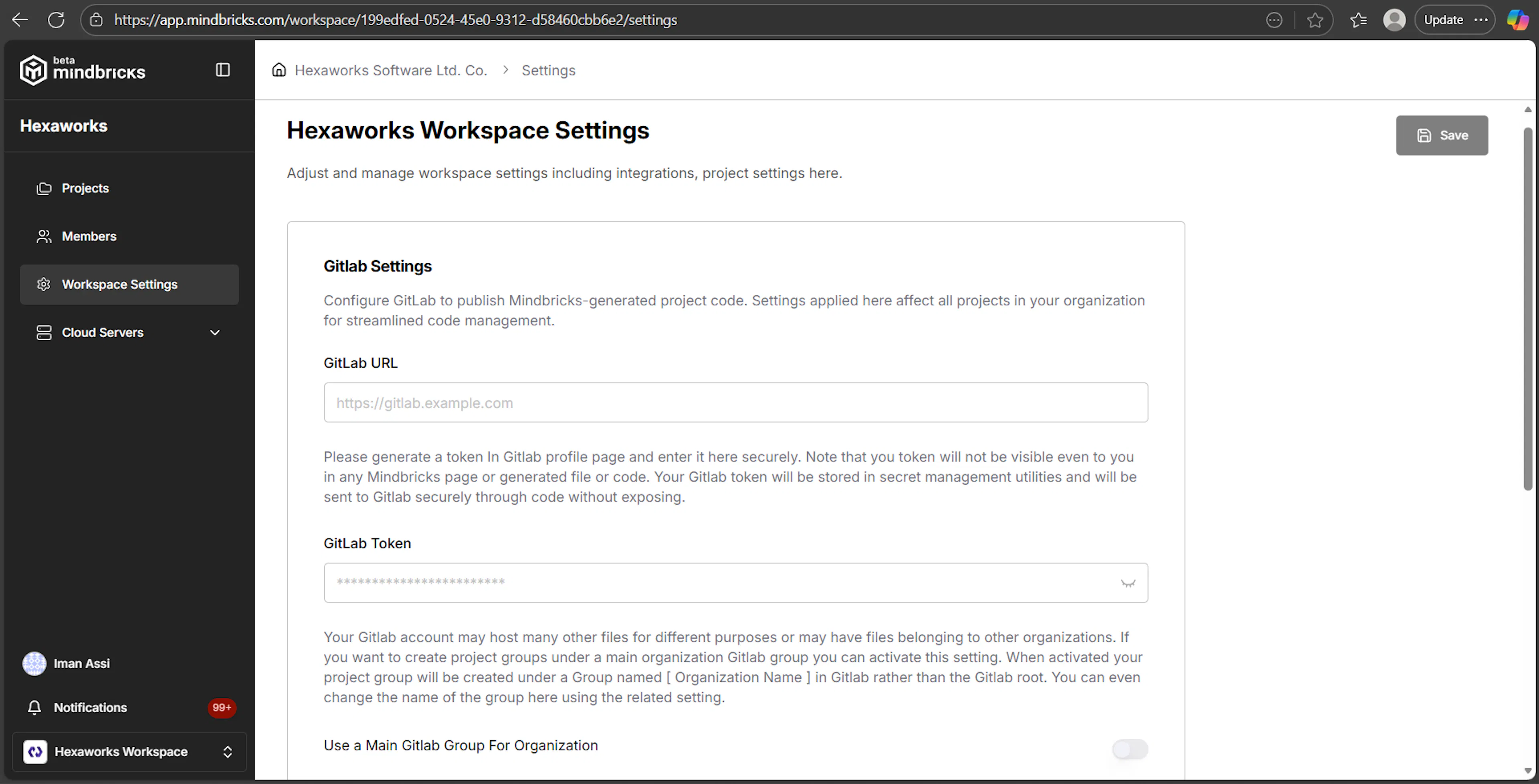
To enable GitLab takeout, configure:
-
GitLab instance URL
-
GitLab access token
-
(Optional) Default GitLab group for organization projects
With these settings, Mindbricks can:
-
Create projects inside your GitLab organization or group
-
Push generated code securely
-
Keep repositories in sync with design updates
How Takeout Settings Are Used
Repository settings are:
-
Configured once per workspace
-
Applied to all projects in that workspace
-
Used for:
-
Code takeout
-
Repository updates
-
External deployment workflows
-
Access tokens are stored securely and are never included in the generated code.
Assets Delivered to Your Repository
When you take your application out of Mindbricks, the platform delivers a complete, production-ready backend codebase to your repository.
Each takeout includes all assets required to run, extend, document, and deploy the application independently.
Repository Structure
The exported repository includes:
-
One folder per microservice
-
Shared configuration and infrastructure files
-
Environment templates
-
Service-level documentation
Each service is fully isolated and can be deployed, scaled, or reused independently.
Included Assets
The following assets are delivered as part of the takeout:
Service Code
-
Fully generated backend services
-
Controllers, routes, and handlers
-
Business logic and workflows
-
Authentication and authorization logic
-
Error handling and middleware
Data Layer
-
Data object models
-
Database mappings
-
Index and relationship definitions
-
Migration-ready schemas
API Definitions
-
REST API endpoints
-
Request validation logic
-
Permission enforcement
-
Standardized response and error formats
Environment Files
-
.env.examplefiles for each service -
Environment variable templates for:
-
Database connections
-
Authentication secrets
-
External integrations
-
Service-specific configuration
-
These files act as a clear contract for configuring environments outside Mindbricks.
Docker & Container Assets
-
Dockerfile for each service
-
Production-ready container configuration
-
Consistent base images and build steps
-
Ready for use with Docker, Docker Compose, or Kubernetes
This allows you to build and run services locally or in any container-based infrastructure.
Package Management
-
package.jsonfor each service -
Defined dependencies and versions
-
Script commands for:
-
Running services
-
Building the project
-
Running tests
-
This ensures reproducible builds and predictable dependency management.
Configuration Files
-
Service-level configuration files
-
Deployment-related settings
-
Runtime options and flags
These files make the system adaptable to different environments and infrastructures.
Generated Tests
- Unit test definitions
Tests can be run locally or integrated into external CI pipelines.
Documentation Assets
Depending on the project configuration, your repository may also include:
-
Project-level documentation
-
Service-level README files
-
API documentation
-
Business API definitions
-
Integration notes for frontend teams
This ensures that teams working outside Mindbricks have full architectural and functional context.
Ownership and Reuse
Once the code is taken out:
-
You have full ownership of all source code
-
You can modify, extend, or refactor services freely
-
You can reuse services across different projects
-
You can integrate with any CI/CD pipeline
-
You can deploy to any infrastructure you own
Mindbricks imposes no runtime lock-in on exported applications.
Updating the Repository
You can continue development in two ways:
-
One-time takeout
Export the code and manage it fully externally -
Iterative takeout
Update the repository again after design changes in Mindbricks
This allows you to combine visual design in Mindbricks with custom external development workflows.
Reusing Mindbricks Generated Services
Manual Deployment Guide
This section explains how to run Mindbricks-generated services outside the Mindbricks platform after you have taken your code out to your own GitHub or GitLab repository.
All project- and service-identity variables are automatically generated by Mindbricks and already included in the exported codebase.
This guide focuses only on the environment variables and connections that you must configure yourself when deploying to external infrastructure.
Deployment Model Overview
Mindbricks services are designed to run using environment-based configuration.
There are no hardcoded credentials or infrastructure assumptions in the code. All external connections are injected at runtime using environment variables.
Your external deployment flow is:
-
Provision required infrastructure services
-
Configure external connection environment variables
-
Build services using Docker or Node
-
Run services using your own orchestrator
Environment Separation
Mindbricks services support multiple runtime environments:
-
test -
dev -
stage -
prod
When deploying externally:
-
Use stage variables for staging deployments
-
Use prod variables for production deployments
Each environment must have its own configuration set.
Example:
NODE_ENV=stage
CONFIG_ENV=stage
Required External Services
Every Mindbricks-generated backend relies on a core set of external infrastructure services that must be provided by you when deploying outside the platform.
These services must exist and be reachable before starting the application.
Always Required External Systems
-
PostgreSQL – The primary transactional database
-
MongoDB – Document-oriented storage for flexible / non-relational data
-
Redis – caching, sessions, queues
-
Elasticsearch – indexing, search, read models
-
Kafka – event-driven communication between services
If any of these services are missing or misconfigured, the application will fail to start.
External Connection Environment Variables
The following environment variables must be configured manually when deploying externally.
PostgreSQL Connection
PG_HOST
PG_USER
PG_PASSWORD
PG_PORT
Used for:
-
Core service data models
-
Relational domain entities
-
Transactional operations
-
ACID-compliant persistence
-
Strongly consistent business logic
MongoDB Connection
MONGODB_HOST
MONGODB_PORT
MONGODB_USER
MONGODB_PASSWORD
Used for:
-
Document-based data models
-
Flexible / schema-less data
-
Logs, events, snapshots, metadata
-
Non-transactional or eventually consistent storage
Redis Connection
REDIS_HOST
REDIS_PORT
REDIS_USER
REDIS_PWD
Used for:
-
Session storage
-
Caching
-
Background jobs
-
Rate limiting
Elasticsearch Connection
ELASTIC_URI
ELASTIC_USER
ELASTIC_PWD
Used for:
-
Search
-
Read models
-
BFF data views
-
Analytics indexes
Kafka Connection
KAFKA_URI
Used for:
-
Event publishing
-
Service-to-service communication
-
Notification triggers
-
Async workflows
Conditional External Environment Variables
Some environment variables exist only if related features were enabled in your Mindbricks project design,such as:
Payments (Stripe)
STRIPE_SECRET
STRIPE_KEY
Required only if payment features are enabled.
AI Providers
OPENAI_API_KEY
ANTHROPIC_API_KEY
Required only if AI-assisted features are enabled.
Other External Integrations
GOOGLE_MAPS_API_KEY

AWS_ACCESS_KEY
AWS_SECRET_KEY

SMTP_HOST
SMTP_USER
SMTP_PASS
Required only if the corresponding integrations are used.
Docker-Based Deployment
Each service includes a production-ready Dockerfile.
You can:
-
Build services individually
-
Use Docker Compose
-
Deploy using Kubernetes
-
Run in any container-based platform
Example:
docker build -t my-service .
docker run --env-file .env.prod -p 3000:3000 my-service
Service Startup Order
When deploying manually, ensure the following startup order:
-
MongoDB
-
Redis
-
Elasticsearch
-
Kafka
-
Mindbricks services
All external services must be running before starting the application layer.
What Mindbricks Does Not Do Externally
When deploying outside Mindbricks, the platform does not:
-
Provision infrastructure
-
Manage secrets
-
Scale services
-
Monitor runtime health
These responsibilities belong entirely to your infrastructure and DevOps setup.
Summary
Manual deployment gives you full control over infrastructure and runtime behavior.
Mindbricks guarantees:
-
Portable services
-
Automatically generated internal configuration
-
Explicit external connections
-
No runtime lock-in
As long as required services are available and external environment variables are correct, Mindbricks-generated applications can run anywhere.