Mindbricks GUI Guide
A Human-Readable Guide to the Mindbricks Platform UI with Pattern-Aware Explanations.
1. Project Level
Entering a project brings you to the Project Home.
A Mindbricks project is defined by:
-
Project Settings → maps to
MindbricksApplication.projectSettings -
Authentication → maps to
ProjectAuthentication -
BFF Service → maps to
BFFService -
Notification Service → maps to
NotificationService -
Services → maps to
Service[]
Agent Ada (the AI architect) remains available in the sidebar to help update or generate patterns.
2. Project Home
Shows:
-
Auto-generated documentation
-
All generated services (auth, bff, notification)
-
All user-created services
-
Entry points for deeper configuration
This page is conceptual — it does not directly write patterns, but is the central navigation anchor.
3. Project Settings Page
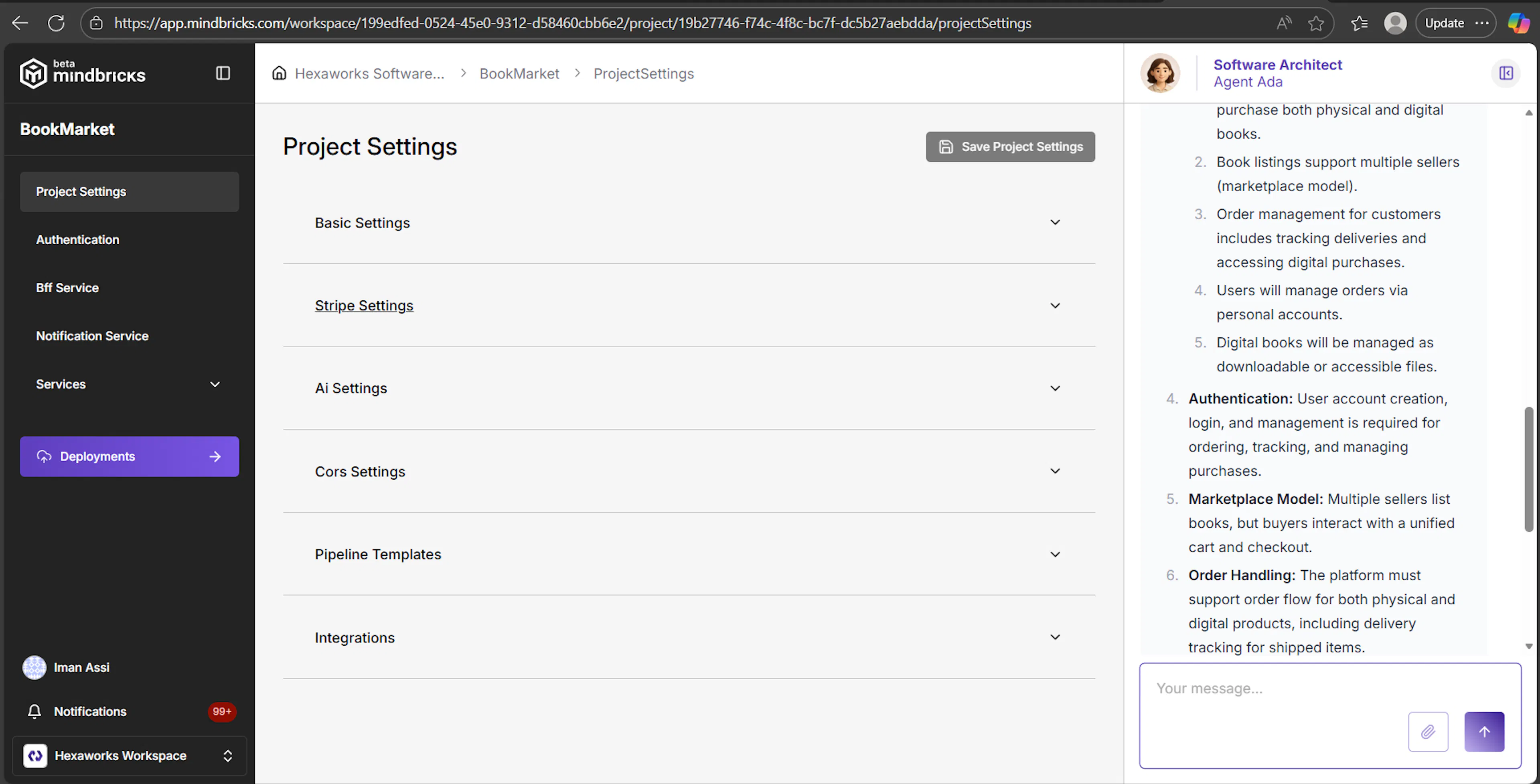
Maps to:
MindbricksApplication.projectSettings pattern
Use this page to define:
-
Project name, fullname, avatar
-
Stripe settings
-
AI provider keys (OpenAI, Anthropic)
-
Custom variables (injected into service libraries, Business APIs, and templates)
Key how-to’s:
-
Use Custom Variables to store environment-like values accessible by MScript.
-
Stripe settings activate the
StripeOrderConfigsystem inside services. -
Enable Authentication when your system requires login/security.
Related patterns:
ProjectSettings, StripeSettings, AiSettings, PipelineTemplates.
4. Authentication Module
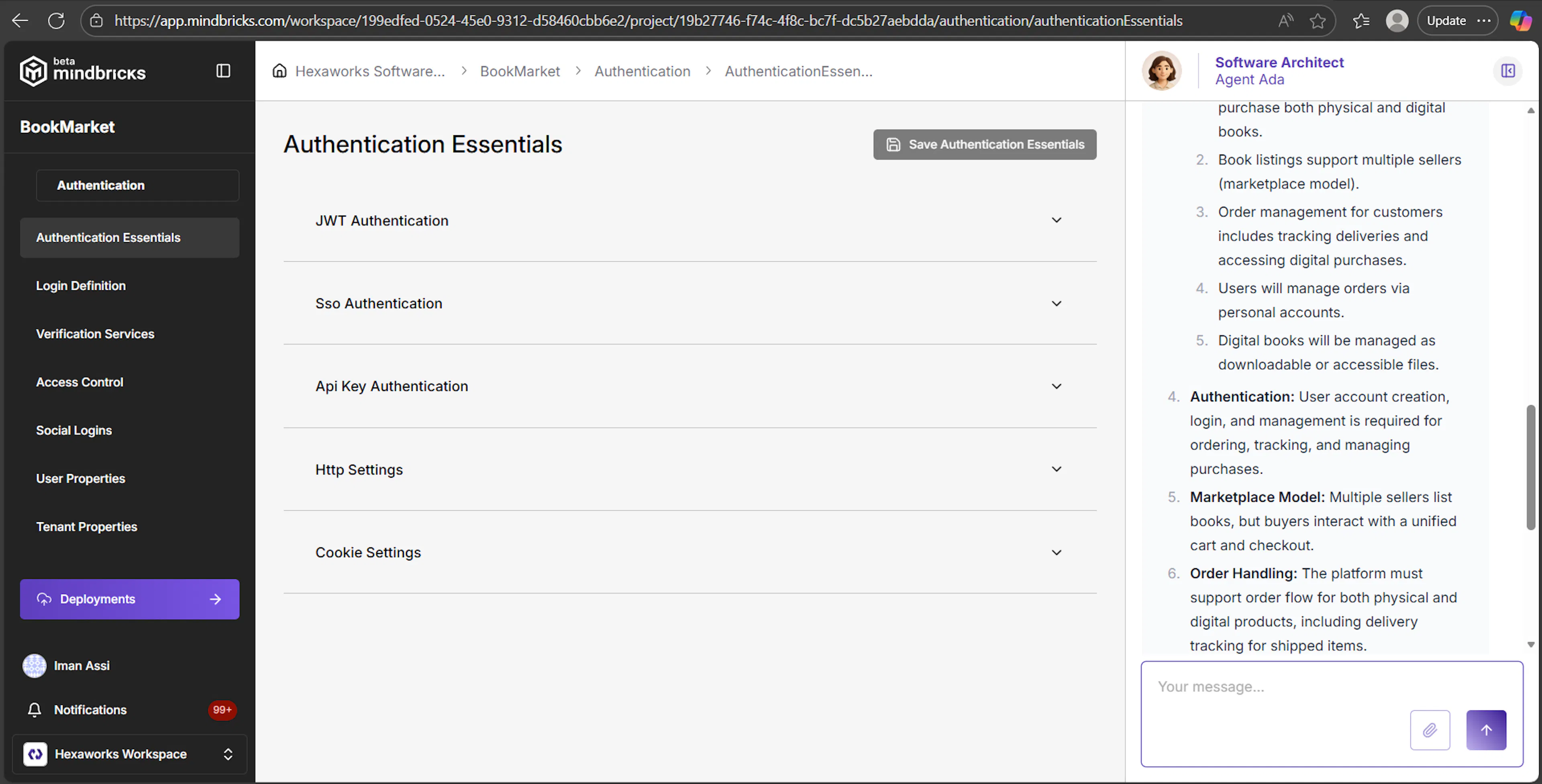
The Authentication module is one of the most important UI sections.
It configures the ProjectAuthentication pattern:
-
login behavior
-
identity structure
-
verification flows
-
access control model
-
SSO
-
user & tenant data properties
Below is the user-friendly version of how everything connects visually.
4.1 Authentication → Authentication Essentials
Maps to:
authenticationEssentials
JWTAuthentication, SSOAuth, RemoteServiceAuthentication, RemoteSessionSettings, ApiKeyAuthentication.
What you configure:
-
JWT Tokens
- Token lifetime, key rotation
-
SSO
-
Provider structure
-
Mapping external profiles (
emailPropertyInProfile,userNamePropertyInProfile, etc.)
-
-
Remote Service Authentication
- Authenticate the API using a remote service
-
Remote Sessions
- Use a remote service as session store
-
API Key Authentication
- A token model for automated clients
When to use it:
-
Enable JWT for most applications
-
Use SSO for enterprise integrations
-
Use API Keys for machine-to-machine communication
4.2 Authentication → Login Definition
Maps to:
loginDefinition pattern.
What you configure:
-
Super Admin credentials
-
Username structure (
asFullnameorasNamePair) -
User mobile/email settings
-
2FA requirements
-
Verification requirements
-
Auto Avatar scripts (MScript)
-
User Groups (if enabled)
-
Multi-Tenant Mode (
tenantSettings)
Pattern mapping examples:
UI field → pattern
-
“User Name Type” →
loginDefinition.userSettings.userNameType -
“User Register Is Public” →
userRegisterIsPublic -
“Use Multi Tenant Feature” →
tenantSettings.useMultiTenantFeature
4.3 Authentication → Verification Services
Maps to:
verificationServices and all nested verification subpatterns.
What you configure: Each verification type:
-
Password reset
-
Email/Mobile verification
-
Email2FA / Mobile2FA
-
Verification template (link or code)
-
resendTimeWindow,expireTimeWindow
MScript-driven Templates:
You define verificationTemplate which formats body and link variables.
4.4 Authentication → Access Control
Maps to:
accessControl, permissionBasics, roleSettings, permissionTypes,
objectBasedSettings, attributeBasedSettings, customRoleLookups.
UI lets you:
-
Enable RBAC (
rbacIsActive) -
Define Roles (
rolesObject) -
Enable PBAC (
pbacIsActive) -
Create permission groups
-
Enable object-based or attribute-based authorization
-
Add ABAC rules using MScript Query
-
Add logical roles (
customRoleLookups)
This page configures the entire platform authorization model.
4.5 Authentication → User / Tenant Properties
Maps to:
ProjectAuthentication.userProperties
ProjectAuthentication.tenantProperties.
These pages use Data Object Property Collection Manager, but simplified for the user and tenant.
You can add:
-
Additional user custom fields
-
Additional tenant custom fields
All property patterns apply, including:
-
Index settings
-
Relations
-
Static Join
-
Filter settings
-
Calculated fields
-
Enum definitions
5. BFF Service
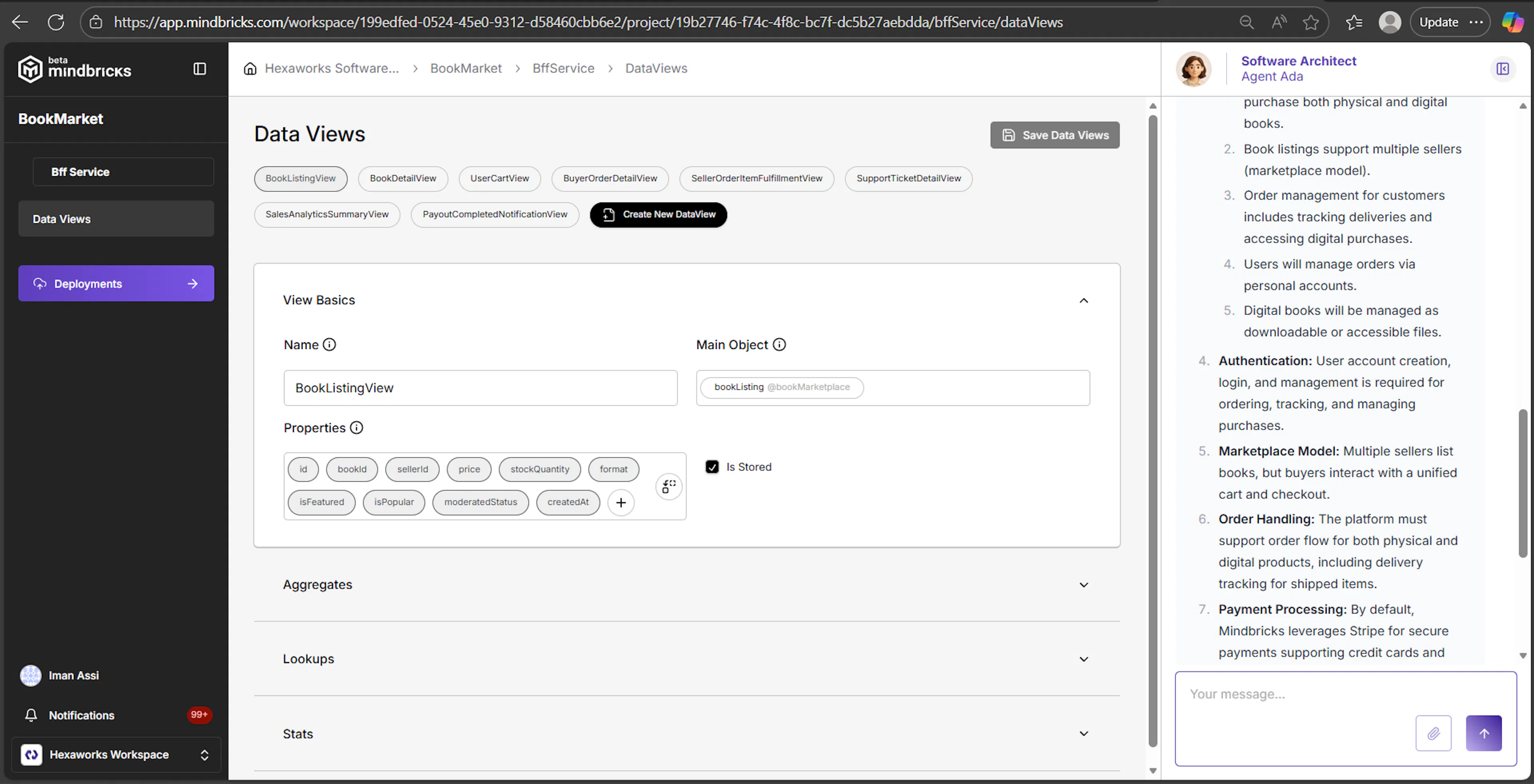
Maps to:
BFFService + DataView[].
5.1 BFF Service → Main Page
Shows documentation and generated code for your BFF Service.
5.2 BFF Service → Data Views
This is a UI for designing DataView patterns.
The most powerful read-model builder of Mindbricks.
Each DataView you define becomes:
-
A stored Elasticsearch view (if
isStored = true) -
A runtime aggregator view (if
isStored = false) -
A BFF endpoint
UI sections map to these patterns:
| UI Section | Pattern |
|---|---|
| View Basics | ViewBasics |
| Aggregates | ViewAggregate[] |
| Stats | ViewStat with AggregateItem[] |
Examples of what users can build:
-
"User Dashboard View" (user + orgs + stats)
-
"Product Details View" (product + images + reviews + stats)
-
"Analytics View"
This page is the GUI equivalent of building a stored materialized read model.
6. Notification Service
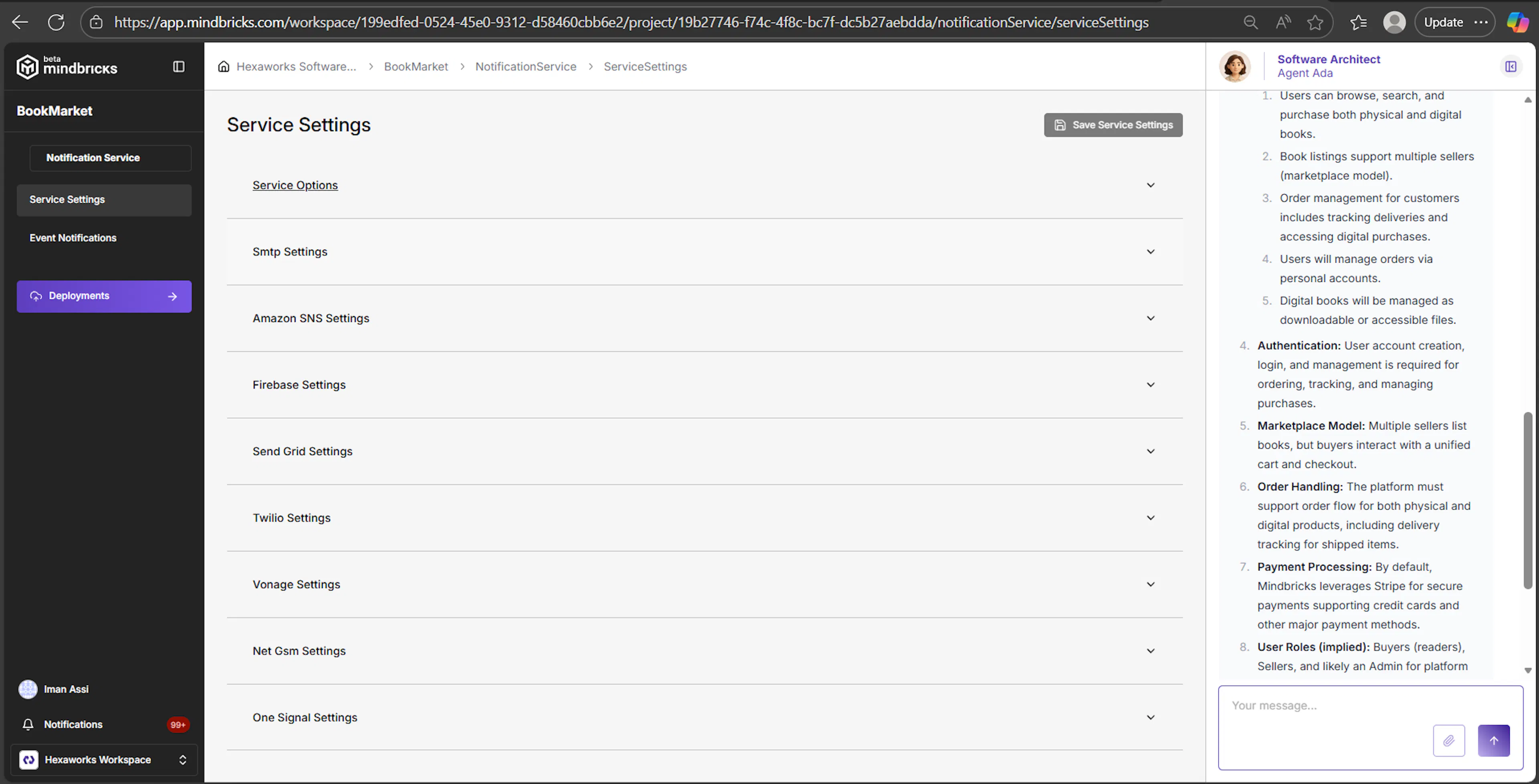
Maps to:
-
NotificationServicepattern -
notificationSettings -
eventNotifications[]
6.1 Notification Service → Service Settings
Configures:
-
Provider selection (SMTP, AWS SNS, Twilio, OneSignal, etc.)
-
Stored notifications
-
Email/SMS/push settings
6.2 Notification Service → Event Notifications
Maps to:
EventNotification pattern.
User configures:
-
Kafka channel → event name
-
Notification type
-
Template (subject/body via EJS)
-
Target extraction
-
Condition to trigger
-
In-app notification storage
The GUI directly aligns with:
-
EventNotificationBasics -
EventDataSettings -
NotificationTarget[] -
NotificationTemplate
7. Services Module
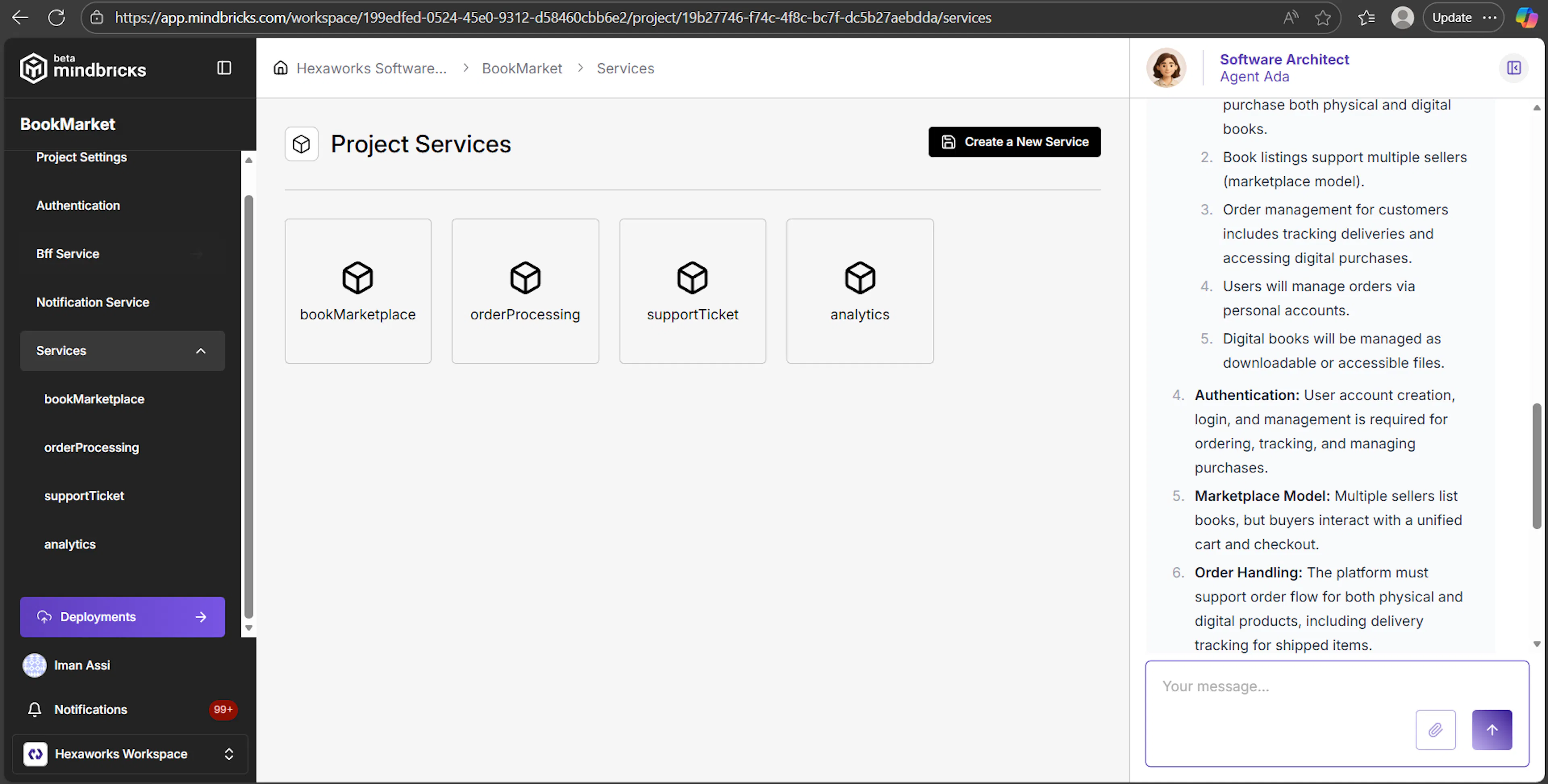
This is one of the most important GUI areas, representing your microservices.
Maps to:
-
services[]pattern -
Each Service maps to a
Servicepattern object
7.1 Services → Main Page
You can:
-
Create new service
-
Delete service
-
Navigate to each service’s main page
8. Inside a Service
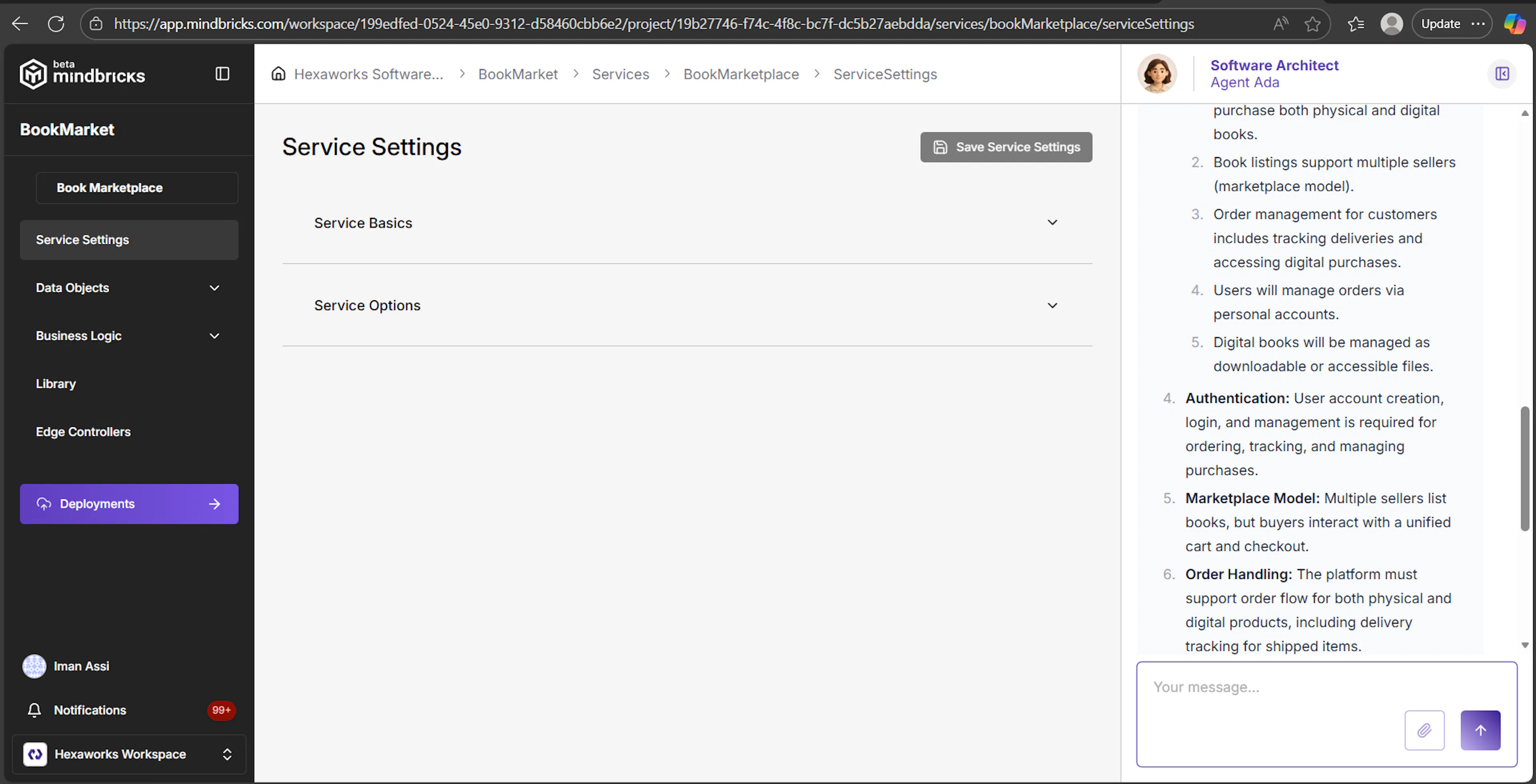
A service contains:
-
Service Settings
-
Data Objects
-
Business Logic
-
Library (functions, templates, assets, hooks)
-
Edge Controllers
Each section maps cleanly to pattern elements.
9. Service → Service Settings
Maps to:
serviceSettings
UI exposes subpatterns:
-
Service Basics →
serviceBasics{name, description, customVariables} -
Node Packages →
npmPackages[] -
Service Options →
serviceOptions-
serviceRequiresLogin -
httpPort -
serviceAllowsUserToLogin
-
-
Data Model → metadata for DB
-
Soft Delete → maps to service-level
useSoftDelete
This page defines how the microservice functions as a whole.
10. Service → Data Objects
Maps to:
dataObjects[] pattern
Data Objects Main Page
Lets you create/remove DataObjects.
10.1 Inside a Data Object
Navigation:
-
Object Settings → data object–level patterns
-
Properties → property-level patterns
10.2 Data Object → Object Settings
Maps to:
-
ObjectSettings -
AuthorizationSettings -
RedisEntityCacheSettings -
CompositeIndex[] -
StripeOrderConfig -
MembershipSettings
This UI is crucial for controlling:
-
Soft delete
-
Access visibility (private/protected/public)
-
Multi-tenant scoping
-
Caching behavior
-
Composite indexes
-
Membership-based access
-
Stripe order flow
The UI accordion structure matches the pattern structure exactly.
10.3 Data Object → Properties
Maps to:
DataProperty pattern
with all nested subpatterns:
-
BasicSettings -
IndexSettings -
EnumSettings -
RelationSettings -
SessionSettings -
ContextSettings -
FormulaSettings -
FilterSettings -
PropertyStaticJoin
This is one of the most powerful UI editors in Mindbricks.
How-to actions:
-
Create simple fields
-
Create relationships
-
Add calculated fields
-
Expose fields for filtering
-
Add static joins (denormalization)
-
Add enum options
-
Add unique constraints
-
Add DB or Elastic indexes
The UI precisely matches the pattern structure.
11. Business Logic
Maps to:
-
businessLogic[](Business APIs) -
BusinessApiActionStore -
Every Action pattern (FetchObjectAction, ListMapAction, CreateCrudAction, etc.)
The GUI shows:
-
Workflow diagram (milestones + actions)
-
Drag & drop action insertion
-
Config modals for each action
-
Context for each Business API
This is where you design service behavior.
Key capabilities:
-
Define
get,list,create,update,deleteAPIs -
Add conditions, validations, fetches
-
Built-in fetch, join, permission, membership logic
-
No need to write controllers manually
-
Business API becomes a code-generated Express route
How-to:
-
Click “Insert Action”
-
Choose from action library
-
Configure using modal
-
Use MScript for conditions or formulas
-
Use milestone settings for response shaping
12. Service → Library
Maps to:
-
service.library.functions[] -
hooks[] -
edgeFunctions[] -
templates[] -
assets[] -
public[]
Where you:
-
Write custom JS functions (used in MScript)
-
Create templates for rendering
-
Add edge functions (for Edge Controllers)
-
Add static assets
Agent Ada can help generate these files.
13. Service → Edge Controllers
Maps to:
-
edgeControllers[] -
Each controller uses an
edgeFunction
This UI lets you:
-
Add fully custom REST endpoints
-
Point them to service library functions
-
Control HTTP paths & methods
-
Require login or not
Edge Controllers give you the escape hatch for advanced logic.
14. Summary
This GUI guide helps you navigate Mindbricks as both:
-
A low-code architectural studio
-
A pattern-based microservice generator
Nearly every UI form aligns directly with a pattern definition, and every page modifies a specific part of the MindbricksApplication tree.
You now know:
-
Where each configuration lives
-
What it configures
-
How it maps to the pattern ontology
-
How to use it effectively
-
How to think about each UI section as an architect
Awesome, let’s add an Appendix: GUI ↔ Pattern Mapping Table to your guide.
You can paste this at the end of the GUI Guide as-is.
Appendix A — Mindbricks GUI ↔ Pattern Mapping
This appendix maps GUI sections to the underlying pattern nodes in patterns.json. Use it when you want to understand exactly what a given page edits in the ontology.
A.1 Workspace Level
Workspace-level pages (Projects, Members, Workspace Settings, Billing, Cloud Servers, etc.) do not directly modify patterns.json. They manage the Mindbricks platform state (organizations, accounts, integrations), not the project ontology.
| GUI Area | Pattern Node | Notes |
|---|---|---|
| Workspace → Projects | (none) | Creates/opens projects; project’s patterns.json lives inside the project. |
| Workspace → Members (Org) | (none) | Workspace membership & roles, outside patterns.json. |
| Workspace → Settings (GitLab/GitHub) | (none) | Org-level integrations, not part of project patterns. |
| Workspace → Subscription / Billing | (none) | Platform billing metadata only. |
A.2 Project Home
| GUI Area | Pattern Node | Notes |
|---|---|---|
| Project Home | MindbricksProject | Conceptual hub; shows high-level summary of projectSettings, authentication, bffService, notificationService, services[]. |
A.3 Project Settings
| GUI Page / Section | Pattern Node | Notes |
|---|---|---|
| Project → Project Settings (page) | MindbricksProject.projectSettings | Root project configuration object. |
| Basic Settings | ProjectSettings.basicSettings (BasicProjectSettings) | Name, fullname, description, avatar, hasAuthentication, ignoreDeploymentSpecificFiles, customVariables. |
| Stripe Settings | ProjectSettings.stripeSettings (StripeSettings) | useStripe, StripeSettingsConfig. |
| AI Settings | ProjectSettings.aiSettings (AiSettings) | openAiApiKey, anthropicApiKey. |
| CORS Settings | ProjectSettings.corsSettings (CorsSettings) | useCorsControl, CorsSettingsConfig. |
| Pipeline Templates | ProjectSettings.pipelineTemplates[] (PipelineTemplate) | EJS templates for CI/CD files. |
| Integrations | ProjectSettings.integrations[] (IntegrationConfiguration) | S3, Telegram, Google Maps, etc. |
A.4 Authentication Module
Authentication root pattern:
MindbricksProject.authentication: ProjectAuthentication
A.4.1 Authentication → Main
| GUI Area | Pattern Node | Notes |
|---|---|---|
| Authentication → Main Page | ProjectAuthentication | Document and code view; no direct edits here. |
A.4.2 Authentication → Authentication Essentials
| GUI Section | Pattern Node | Notes |
|---|---|---|
| JWT Authentication | ProjectAuthentication.authenticationEssentials.JWTAuthentication (JWTAuth) and JWTAuthConfig | Enable JWT + token/key lifetimes. |
| SSO Authentication | ProjectAuthentication.authenticationEssentials.ssoAuthentication (SSOAuth) + SSOAuthConfig + SSOServerSettings | SSO provider & mapping. |
| Remote Service Authentication | ProjectAuthentication.authenticationEssentials.remoteServiceAuthentication (RemoteServiceAuthentication) + RemoteServiceAuthenticationConfig | Auth delegated to remote user service. |
| Remote Session Settings | ProjectAuthentication.authenticationEssentials.remoteSessionSettings (RemoteSession, RemoteSessionConfig) | Session retrieval from remote service. |
| API Key Authentication | ProjectAuthentication.authenticationEssentials.apiKeyAuthentication (APIKeyAuth, APIKeyAuthConfig) | API key + secret placement. |
| HTTP Settings | ProjectAuthentication.authenticationEssentials.httpSettings (AuthHttpSettings) | Auth service port & router suffix. |
| Cookie Settings | ProjectAuthentication.authenticationEssentials.cookieSettings (CookieSettings) | Allowed domains for auth cookies. |
A.4.3 Authentication → Login Definition
| GUI Section | Pattern Node | Notes |
|---|---|---|
| User Settings | ProjectAuthentication.loginDefinition.userSettings (LoginDefUserSettings) | Super admin, name type, verification/2FA, groups, scripts. |
| Tenant Settings | ProjectAuthentication.loginDefinition.tenantSettings (LoginDefTenantSettings, LoginDefTenantSettingsConfig) | Enable multi-tenancy, tenant name, public creation, avatars. |
A.4.4 Authentication → Verification Services
| GUI Section | Pattern Node | Notes |
|---|---|---|
| Verification Settings | ProjectAuthentication.verificationServices.verificationSettings (VerificationSettings) | verificationMode (test/live). |
| Password Reset By Email | verificationServices.passwordResetByEmail (PasswordResetByEmail, VerificationConfig) | Email-based reset. |
| Password Reset By Mobile | verificationServices.passwordResetByMobile (PasswordResetByMobile) | SMS reset. |
| Email 2 Factor | verificationServices.email2Factor (Email2Factor) | Email 2FA. |
| Mobile 2 Factor | verificationServices.mobile2Factor (Mobile2Factor) | SMS 2FA. |
| Email Verification | verificationServices.emailVerification (EmailVerification) | Email verification. |
| Mobile Verification | verificationServices.mobileVerification (MobileVerification) | SMS verification. |
A.4.5 Authentication → Access Control
| GUI Section | Pattern Node | Notes |
|---|---|---|
| Permission Basics | ProjectAuthentication.accessControl.permissionBasics (PermissionBasics, PermissionBasicsConfig, PermissionGroup[]) | PBAC + permission groups. |
| Role Settings | ProjectAuthentication.accessControl.roleSettings (RBACSettings, RBACSettingsConfig, RoleItem[], customRoleLookups) | RBAC roles, multi-role, derived roles. |
| Permission Types | ProjectAuthentication.accessControl.permissionTypes (PermissionTypes) | Toggles role/user/group/object/tenant-based permissions. |
| Object Based Settings | ProjectAuthentication.accessControl.objectBasedSettings (OBACPermission) | OBAC: which DataObjects support per-object permissions. |
| Attribute Based Settings | ProjectAuthentication.accessControl.attributeBasedSettings (AbacPermission, ABACDefinititon[]) | ABAC rules using MScript whereClause. |
A.4.6 Authentication → Social Logins
| GUI Section | Pattern Node | Notes |
|---|---|---|
ProjectAuthentication.socialLogins.google (GoogleLoginSetting, GoogleLoginConfig) | Google OAuth2. | |
| Apple | ProjectAuthentication.socialLogins.apple (AppleLoginSetting, AppleLoginConfig) | Apple OAuth2. |
| GitLab | ProjectAuthentication.socialLogins.gitlab (GitlabLoginSetting, GitlabLoginConfig) | GitLab OAuth2. |
| GitHub | ProjectAuthentication.socialLogins.github (GithubLoginSetting, GithubLoginConfig) | GitHub OAuth2. |
A.4.7 Authentication → User Properties / Tenant Properties
| GUI Page | Pattern Node |
|---|---|
| Authentication → User Properties | ProjectAuthentication.userProperties[] (DataProperty) |
| Authentication → Tenant Properties | ProjectAuthentication.tenantProperties[] (DataProperty) |
These use the full DataProperty pattern and all its sub-settings.
A.5 BFF Service
| GUI Page | Pattern Node | Notes |
|---|---|---|
| BFF Service → Main | MindbricksProject.bffService (BFFService) | Display only. |
| BFF Service → Data Views | BFFService.dataViews[] (DataView) | Full DataView designer. |
DataView sections:
| UI Section | Pattern Node |
|---|---|
| View Basics | DataView.viewBasics (ViewBasics) |
| Aggregates | DataView.aggregates[] (ViewAggregate) |
| Stats | DataView.stats[] (ViewStat, AggregateItem[]) |
A.6 Notification Service
| GUI Page | Pattern Node |
|---|---|
| NotificationService → Main | MindbricksProject.notificationService (NotificationService) |
| NotificationService → Service Settings | NotificationService.serviceSettings (NotificationServiceSettings, NotificationServiceOptions + provider settings like SmtpSettings, TwilioSettings, etc.) |
| NotificationService → Event Notifications | NotificationService.eventNotifications[] (EventNotification) |
EventNotification accordions:
| UI Section | Pattern Node |
|---|---|
| Event Notification Basics | EventNotification.eventNotificationBasics (EventNotificationBasics) |
| Event Data Settings | EventNotification.eventDataSettings (EventDataSettings) |
| Targets | EventNotification.targets[] (NotificationTarget) |
| Template | EventNotification.template (NotificationTemplate) |
A.7 Services & Service-Level Pages
At top-level:
MindbricksProject.services[] : Service
A.7.1 Services → Main Page
| GUI Page | Pattern Node |
|---|---|
| Services → Main | MindbricksProject.services[] overview (create/delete Service entries). |
A.7.2 Service → Main / Service Settings
| GUI Page / Section | Pattern Node |
|---|---|
| Service Main Page | Service (display only) |
| Service → Service Settings → Service Basics | Service.serviceSettings.serviceBasics (ServiceBasics) |
| Service → Service Settings → Service Options | Service.serviceSettings.serviceOptions (ServiceOptions) |
ServiceBasics includes name/description/customVariables/nodejsPackages.
ServiceOptions includes serviceRequiresLogin, httpPort, dbType, useSoftDelete, etc.
A.8 Service → Data Objects
Service.dataObjects[] : DataObject
A.8.1 Data Objects → Main Page
| GUI Page | Pattern Node |
|---|---|
| Data Objects → Main | Service.dataObjects[] overview. |
A.8.2 Data Object → Main / Object Settings / Properties
| GUI Page / Section | Pattern Node |
|---|---|
| Data Object → Main | DataObject (documentation only) |
| Data Object → Object Settings → Basic Settings | DataObject.objectSettings.basicSettings (ObjectBasicSettings) |
| Object Settings → Authorization | DataObject.objectSettings.authorization (ObjectAuthorization) |
| Object Settings → Redis Entity Cache Settings | DataObject.objectSettings.redisEntityCacheSettings (RedisEntityCacheSettings, RedisEntityCacheConfig) |
| Object Settings → Composite Index Settings | DataObject.objectSettings.compositeIndexSettings[] (CompositeIndex) |
| Object Settings → Stripe Order | DataObject.objectSettings.stripeOrder (StripeOrder, StripeOrderConfig) |
| Object Settings → Membership Settings | DataObject.objectSettings.membershipSettings (MembershipSettings, MembershipSettingsConfig) |
A.8.3 Data Object → Properties
| GUI Page / Section | Pattern Node |
|---|---|
| Properties Page (Property list) | DataObject.properties[] (DataProperty) |
| Property → Basic Settings | DataProperty.basicSettings (PropertyBasicSettings) — carries type, isRequired, isArray, isFilterParameter, enumOptions (when type === 'Enum'), defaultValue, and the rest of the per-property flags |
| Property → Index Settings | DataProperty.indexSettings (PropertyIndexSettings) |
| Property → Relation Settings | DataProperty.relationSettings (PropertyRelation) — block presence activates an FK relationship; flat (no configuration wrapper) |
| Property → Session Settings | DataProperty.sessionSettings (PropertySessionSettings) — block presence makes the property session-bound; the framework auto-injects session[sessionParam] at write time |
| Property → Static Join | DataProperty.staticJoin (PropertyStaticJoin) — block presence makes the property join-bound; the framework runs the join at write time |
| (per-API write declaration) | System-managed values land in each create/update BusinessApi's dataClauseItems[] (a list of DataMapItem) |
A.9 Service → Business Logic (Business APIs)
Service.businessLogic[] : BusinessApi
A.9.1 Business Logic → Main Page
| GUI Page | Pattern Node |
|---|---|
| Business Logic → Main | Service.businessLogic[] overview. |
A.9.2 Business API Page
| GUI Section | Pattern Node |
|---|---|
| CRUD Type, Data Object Name, Description | BusinessApi.apiOptions (ApiOptions) |
| Auth Options | BusinessApi.authOptions (ApiAuthOptions) |
| REST Settings | BusinessApi.restSettings (ApiRestSettings, ApiRestSettingsConfig) |
| gRPC Settings | BusinessApi.grpcSettings (ApiGrpcSettings, ApiGrpcSettingsConfig) |
| Kafka Settings | BusinessApi.kafkaSettings (ApiKafkaSettings, ApiKafkaSettingsConfig) |
| Socket Settings | BusinessApi.socketSettings (ApiSocketSettings, ApiSocketSettingsConfig) |
| Cron Settings | BusinessApi.cronSettings (ApiCronSettings, ApiCronSettingsConfig) |
| Select Clause | BusinessApi.selectClause (SelectClauseSettings, SelectJoin[]) |
| Where Clause | BusinessApi.whereClause (WhereClauseSettings, ExtendedClause[]) |
| Request Parameters | BusinessApi.requestParameters[] (BusinessApiParameter) — full input shape declaration |
| Data Clause Items | BusinessApi.dataClauseItems[] (DataMapItem) — the per-API write map for create / update APIs |
| Delete Options | BusinessApi.deleteOptions (DeleteOptions) |
| Get Options | BusinessApi.getOptions (GetOptions) |
| List Options | BusinessApi.listOptions (ListOptions with ListPermissionFilter, ListMembershipFilter, ListSearchFilter, ListJointFilterSettings, etc.) |
| Pagination Options | BusinessApi.paginationOptions (PaginationOptions) |
| Actions | BusinessApi.actions (BusinessApiActionStore & all actions like FetchObjectAction, CreateCrudAction, etc.) |
| Workflow (milestones & actions) | BusinessApi.workflow (BusinessWorkflow and CreateBusinessWorkflow, UpdateBusinessWorkflow, etc.) |
A.10 Service → Library
| GUI Section | Pattern Node |
|---|---|
| Functions | Service.library.functions[] (LibModule) |
| Edge Functions | Service.library.edgeFunctions[] (LibModule) |
| Templates | Service.library.templates[] (LibModule) |
| Assets | Service.library.assets[] (LibModule) |
| Public | Service.library.public[] (LibModule) |
LibModule maps to a file with moduleName, moduleExtension, and moduleBody.
A.11 Service → Edge Controllers
| GUI Section | Pattern Node |
|---|---|
| Edge Controllers list | Service.edgeControllers[] (EdgeController) |
| Edge Controller Options | EdgeController.edgeControllerOptions (EdgeControllerOptions) |
| Edge REST Settings | EdgeController.edgeRestSettings (EdgeRestSettings) |
Edge controllers reference library.edgeFunctions[moduleName].
A.12 Profile / Account Pages
Profile-related GUI pages operate at the Mindbricks account level, not at project pattern level. They do not map to project patterns.json.
| GUI Page | Pattern Node |
|---|---|
| Profile → Personal Information | (none) |
| Profile → Security | (none) |
| Profile → Organizations | (none) |
| Profile → Linked Accounts | (none) |
They manage user profile, security, organizations, and OAuth links at platform level.